

Maybe your team already has AI subscriptions, but everyday work hasn't improved the way you hoped. A few people use the tools constantly. Others barely open them. You still have to fix the follow-up emails, check the summaries, or explain the same background again. Getting AI to help can start to feel like another job.
So you start looking for training. Now you're comparing courses, workshops, and trainers that can sound pretty similar. How do you tell which will help your team do better work?
TL;DR
I'd compare providers on one real task your team struggles with. Start with a small trial using approved tools and inputs. Ask the actual instructor to teach the task, show how to check the result, and let employees try a fresh example without step-by-step help. Compare the instructions employees keep, the support they'll need, and the full cost, including setup and follow-up. Before expanding, check whether the approach gets used again and what the next group needs.
Find the Gap in One Real Task
Take meeting follow-ups. You might get a summary after every call and still have a pile of work to do before anyone receives a useful follow-up.
I was casually helping a friend with meeting recaps. We worked on a central place for context about what they were doing, what a useful recap should look like, and how the AI could get to the relevant recordings. I don't know whether my friend used it afterward, so I can only speak to what we worked on together.
What interested me was the work that could happen after the recap. Could we use that meeting context to prepare a follow-up, connect an action item to the work it belongs to, or prepare an update for the right record in a customer relationship management (CRM) system?
Summaries are already a feature of meeting tools. Fathom, for example, describes turning a captured in-person conversation into a transcript, summary, and action items in its product documentation. Before paying for training or building a new workflow, check how far your existing tool gets you.
Maybe the follow-up needs background about the relationship or your team's way of recording decisions. A summary that sounds fine can still leave out the one thing you needed to act on.
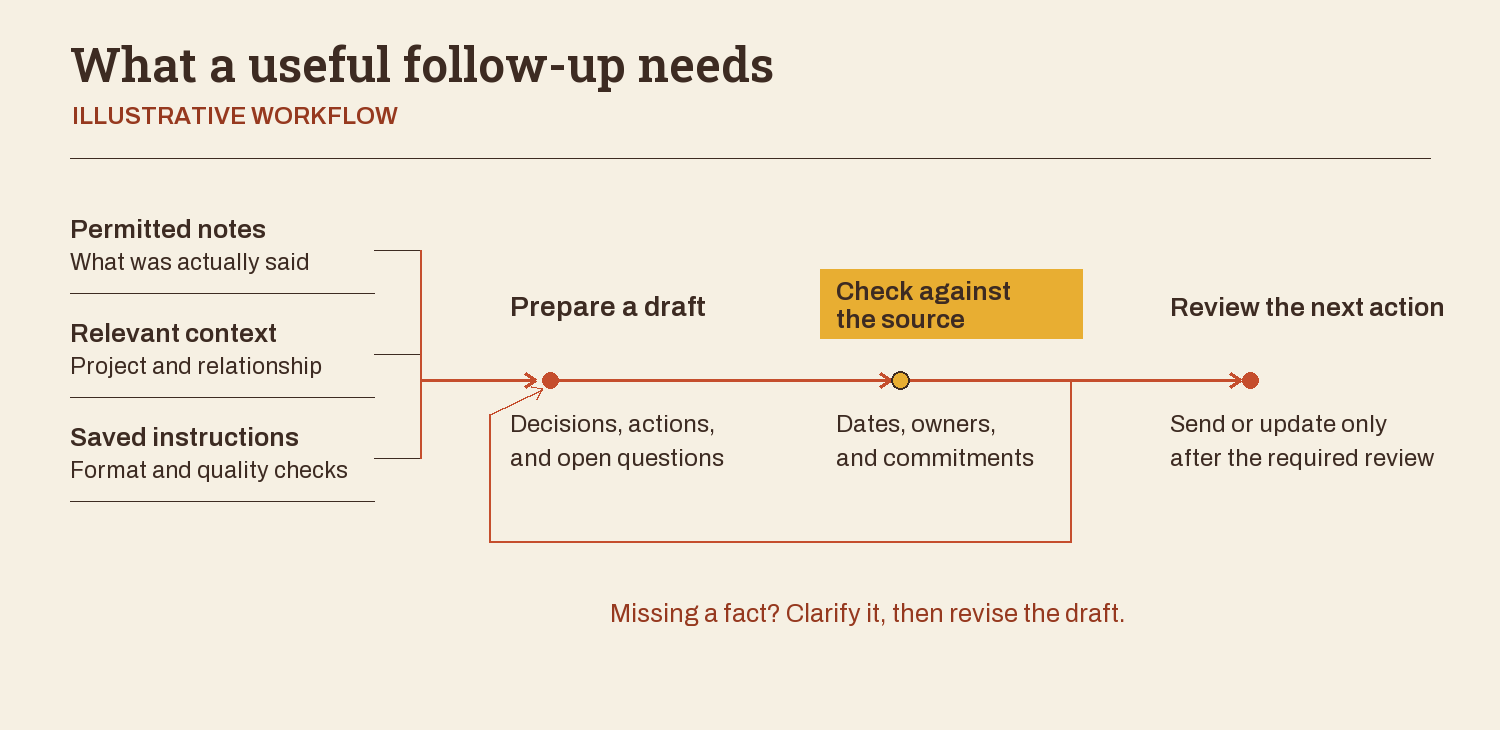
What a useful follow-up needs
ILLUSTRATIVE WORKFLOW
What was actually said
Project and relationship
Format and quality checks
Decisions, actions, and open questions
Dates, owners, and commitments
Send or update only after the required review
Missing a fact? Clarify it, then revise the draft.
A short brief helps you turn that gap into something a trainer can work with. Fill it in with the person who does the work:
- Task and reader: What needs to get done, how often, and who will use it?
- Inputs and access: What source material, approved tools, and workspaces are available?
- Useful output: What should the result contain? Is there an example you like?
- Current difficulty: Where does the work get stuck or go wrong?
- Checks and decisions: What must be checked against the source, and who reviews any next action?
- Practice case: What different example could someone try using the same approach?
For a meeting follow-up, the inputs might be permitted notes and relevant project background. The output might be a draft with decisions, actions, and open questions, checked by the person responsible before sending.
Writing the brief can also reveal a problem training won't resolve by itself. If nobody has decided who owns the next action, the AI doesn't have a reliable answer to retrieve. If an employee can't access the source material, another prompting lesson won't grant access. Ask the provider which parts need teaching, which need setup, and which need a decision from your team.
Match the Training to Each Person's Starting Point
The brief tells you what the work needs. Now consider who will do it. Someone opening an AI tool for the first time may need help making a clear request and understanding why a confident answer can still be wrong. Someone already drafting with AI may need practice supplying better context or catching changes in meaning. Putting both through the same introduction may leave one lost and the other waiting for something useful.
Everyone also needs to understand your company's rules for that work: which tools they can use, what information they can provide, and which actions need approval. Clarify these before using real material in a lesson. A trainer can help employees apply the rules, but your company still has to make the underlying decisions.
Beyond that shared foundation, the depth should follow the responsibility. The employee preparing a follow-up needs to choose the right notes, direct the draft, and check it. Their manager needs to define acceptable work and decide what requires further review. The person connecting the system to recordings or other tools needs to understand access, possible changes to records, and what to do when a connection fails. Ask the provider how they'd handle those different needs.
Have people show an ordinary attempt and explain where they get stuck. That gives you something more specific to discuss than whether they call themselves a beginner or an advanced user. Use it to agree where teaching should start and what can wait.
Watch How the Teacher Builds Understanding
How do you know whether someone is good enough with AI to teach you or your team? Seeing their own work gives you something concrete to judge. Ask them to show you their setup, explain the choices behind it, and walk through how they'd approach the task in your brief. You'll get a sense of both their ability with AI and how well they help you understand it.
For my own learning, I'd bring questions about coordinating several AI agents and checking complex work. By agents, I mean AI systems that can use tools to work through tasks. Your team might need help with a meeting follow-up. In either case, I'd listen for what the teacher would inspect first and why.
A lot of the people I work with have mainly used ordinary chats in ChatGPT or Claude. Sometimes they expect the AI to have information they mentioned in an older conversation, without checking whether it's available for this task.
I often help them put relevant context somewhere the AI can access, connect the tools they need, and work through something useful. That can feel unfamiliar if you've never organized a knowledge base or built a system before, so I try to introduce the complexity as we need it.
In a separate teaching session, I asked the learner to have the AI put a small text file on the desktop, then check whether it was there. A tiny task like that gives you a concrete way to check tool access before asking the system to do more. Later, as we moved toward choosing a task, I said:
Let's make something that could be actually useful.
I asked the learner to describe relevant work context and tell the AI to save it. We then looked at where that context should go and how to organize it.
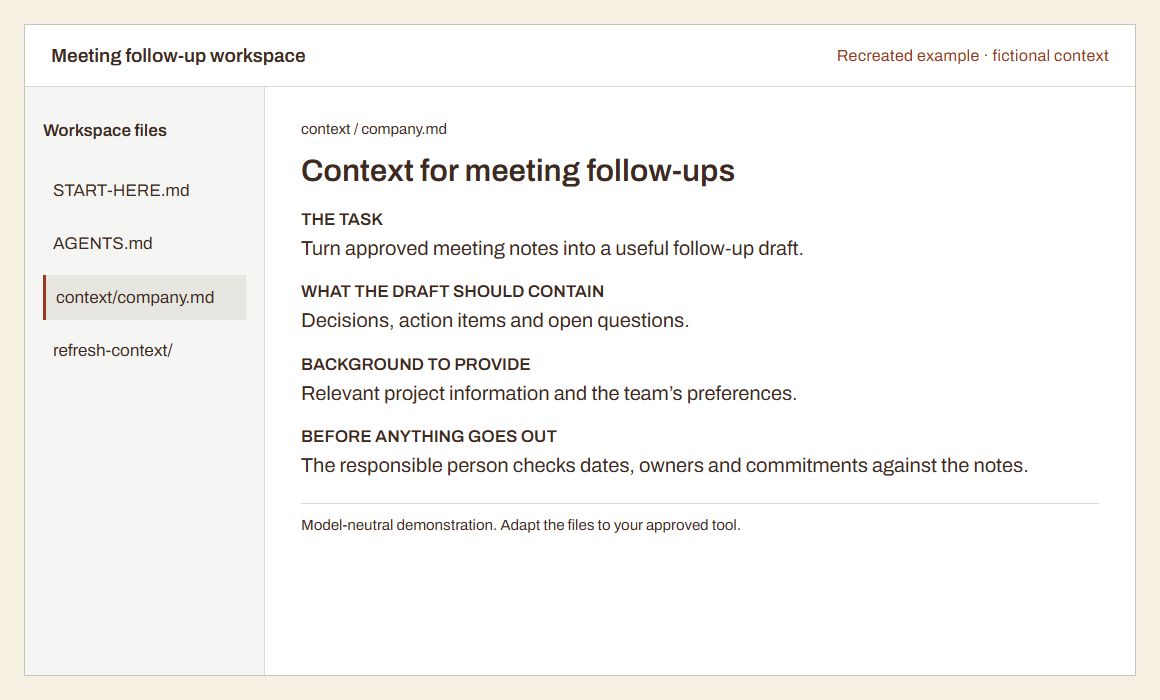
Context for meeting follow-ups
THE TASK
Turn approved meeting notes into a useful follow-up draft.
WHAT THE DRAFT SHOULD CONTAIN
Decisions, action items and open questions.
BACKGROUND TO PROVIDE
Relevant project information and the team’s preferences.
BEFORE ANYTHING GOES OUT
The responsible person checks dates, owners and commitments against the notes.
For that approach to be useful back at work, check it in your team's actual environment. Can the tool read the permitted input? Can the learner find the saved output? If a tool can't open a private link, agree on an approved way to provide the material or say what will remain manual.
For the meeting task, ask how the teacher would help someone choose the relevant notes and background, then explain what the follow-up needs to contain. Those choices matter on the next meeting, too. So does knowing whether the draft is right.
Try this before a training session: build a useful work profile from sources you choose. It gives the teacher and your AI a clearer starting point.
Make Checking Part of the Work
If you're already spending time fixing AI output, pay close attention to how the teacher handles mistakes. In my experience, missing context and weak checks are common reasons work goes wrong. Sometimes the model or tool isn't capable enough. Repeating the request harder doesn't necessarily fix that.
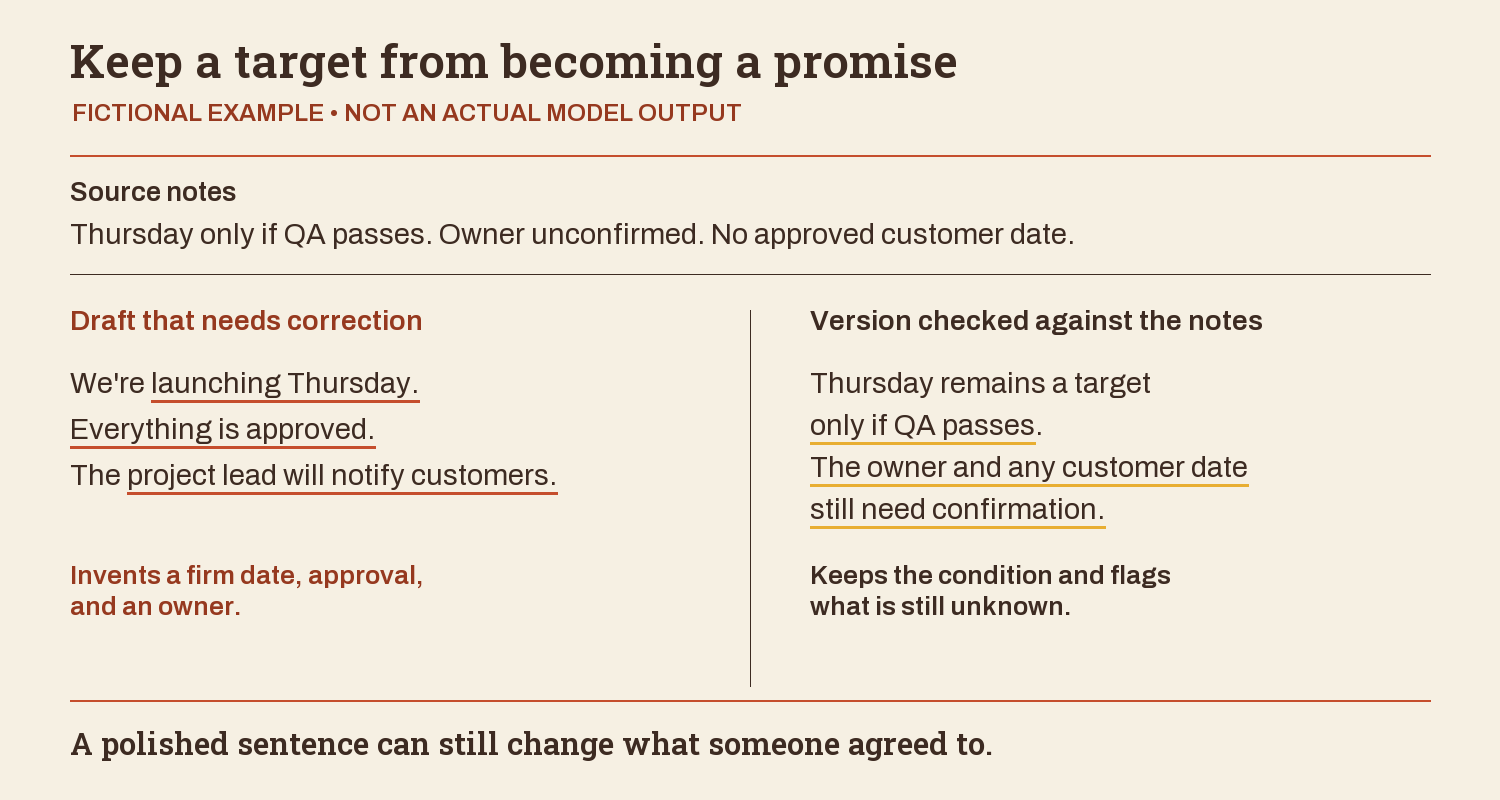
Here's a fictional project update about quality assurance (QA) testing that you can use to discuss checking with a trainer. The source notes and both drafts are invented for this illustration.
Source notes: The draft is complete. QA starts Tuesday. Thursday is a target only if QA passes. The owner is unconfirmed. No customer date is approved.
Draft that needs correction: We're launching to customers Thursday. Everything is approved, and the project lead will notify customers.
That draft reads smoothly, but Thursday became a firm commitment. The QA condition disappeared. Approval was invented, along with someone responsible for telling customers.
Checked version: The draft is complete. QA starts Tuesday. Thursday remains a target only if QA passes. The owner and any customer date still need confirmation.
Keep a target from becoming a promise
FICTIONAL EXAMPLE • NOT AN ACTUAL MODEL OUTPUT
Thursday only if QA passes. Owner unconfirmed. No approved customer date.
Draft that needs correction
We're launching Thursday. Everything is approved. The project lead will notify customers.
Invents a firm date, approval, and an owner.
Version checked against the notes
Thursday remains a target only if QA passes. The owner and any customer date still need confirmation.
Keeps the condition and flags what is still unknown.
A polished sentence can still change what someone agreed to.
Ask a teacher how they'd help your team catch those changes. Then save the useful instructions: preserve conditional dates, flag unknown owners, and identify what needs confirmation. The person reviewing the next draft still needs to compare it with the notes before any message goes out or record changes.
Have an answer that missed the mark? Use the repair worksheet to find the gap and check the next version against the original task.
See What Happens When They Try Again
When the next meeting needs a follow-up, the learner will have new notes to work from. They may remember getting a good draft last time but struggle to find the context or instructions that helped produce it. Saving those somewhere easy to find gives them a starting point for the next attempt.
Fill in a short card while the actual tool, location, and checks are in front of you:
Open: [approved tool and exact saved setup]
Provide: [fresh source material and relevant context]
Ask: [one task and the format you need]
Check: [three important facts or fields against the source]
If something is missing or conflicts: [flag it and ask whom?]
Before sending or changing anything: [human review step]
Name where the notes come from, where the draft belongs, and who handles unresolved questions. If someone still needs to explain every line, make the card more specific.
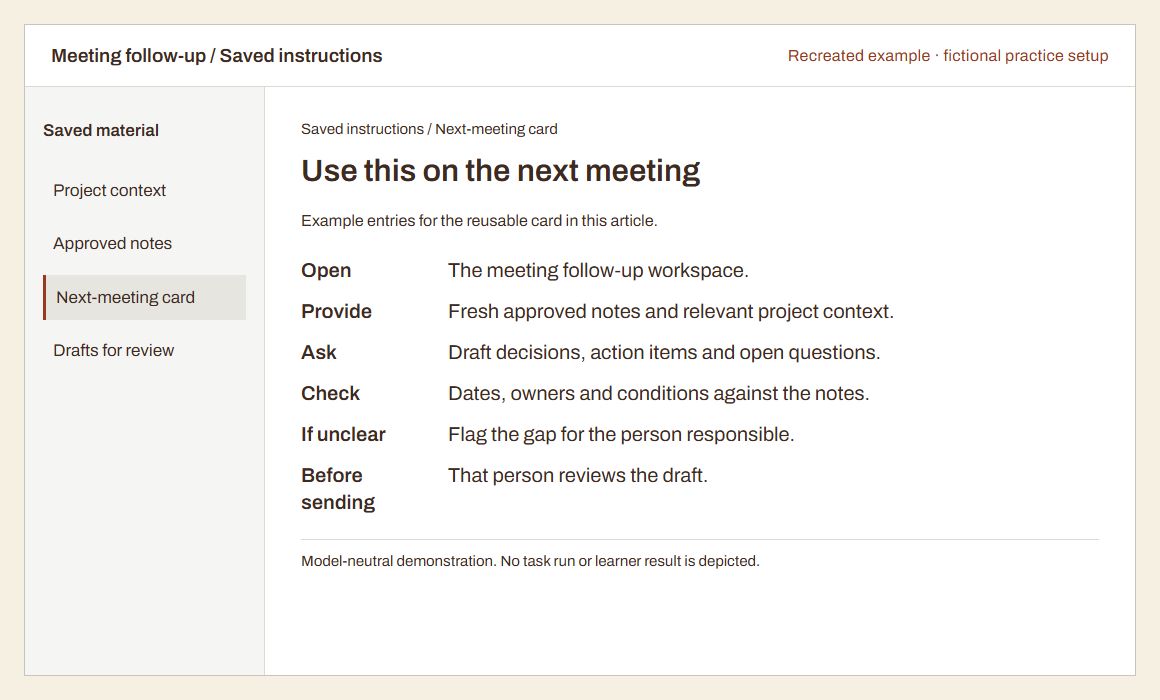
Use this on the next meeting
Example entries for the reusable card in this article.
- Open
- The meeting follow-up workspace.
- Provide
- Fresh approved notes and relevant project context.
- Ask
- Draft decisions, action items and open questions.
- Check
- Dates, owners and conditions against the notes.
- If unclear
- Flag the gap for the person responsible.
- Before sending
- That person reviews the draft.
Then try a new, comparable example. For a practice exercise, you could use another fictional set of meeting notes with different dates and one owner deliberately left unknown. See whether the learner can find the setup, supply the new input, and notice that the owner still needs confirmation without being guided through every step.
Record what actually happens: they completed it independently, needed a hint, couldn't access the source, or got stuck because a decision was missing. Each points to a different next step. An access problem might need setup work; missing a conditional date might need more practice checking commitments. One attempt tells you about that attempt. Later use is something you'll need to check separately.
At the next real occurrence of the task, ask what was used, what had to change, and where help was needed. Look at a permitted example together, including any corrections. If the method wasn't used, find out whether the task never came up, the setup was hard to find, or the approach wasn't useful. Each calls for a different response.
Choose the Format and Support Your Team Needs
Some people pick this up quickly. They try things between sessions, get comfortable with the pieces, and start experimenting. Others need more guidance. And some people only need a fairly simple workflow in the first place.
I've heard from people who have kept using the systems we worked on and say they've changed how they work. For others, my impression is that only part of what we worked on sticks, or they return to earlier habits. I don't assume that one session means someone will suddenly start doing everything with agents.
Use what you saw in practice, along with the team's needs and learning pace, to compare the formats:
- Self-paced learning can fit when people can make time for a course and apply it to their own tasks. Check whether the exercises relate to your brief and what help is available if someone gets stuck. For tool-specific lessons, check when they were last updated and whether the examples still match what your team uses.
- An open live cohort can fit when employees would benefit from scheduled sessions with learners from other organizations. Ask how much time they get to practice and receive feedback, and whether the shared examples suit their work. It may be less suitable if the lesson depends on private information or a setup the wider group won't use.
- Private team instruction can fit when coworkers need to work through a shared task, tools, and internal rules together. Ask what the provider will adapt and what participants will actually do. A session reserved for your team doesn't by itself mean the exercises are relevant or everyone will get individual help.
Support and implementation are separate choices within those formats. If people can follow a lesson but get stuck on new cases, ask about feedback on later attempts. If the immediate need is to build or connect a system, scope that help separately and agree what employees will learn to manage.
Planning training across departments? Explore corporate AI training.
My concern is paying repeatedly for the same kind of work while never gaining the understanding to adapt it. I would ask a provider what you'll own, what you'll know how to change, and when they expect you'll need them again. More sessions can be useful. They should have a clear purpose.
For Teams, Make Useful Work Easy to Share
If uneven use is part of your team's problem, I'd also ask how people could learn from each other's work. One person may have a useful way to prepare a follow-up while a coworker is starting from scratch.
Involve the people doing the work before booking a group session. Ask which part is frustrating, what they've already tried, and what concerns them about using AI. Someone may want help with a repetitive draft but prefer to handle a sensitive conversation personally. That is useful information for choosing the task.
If employees are worried about how the work or their roles might change, explain the purpose of the training and what management has actually decided. Don't promise certainty you can't offer. Make room for someone to say they don't understand a step or that the proposed method doesn't fit their job.
You could start with a small, willing group whose work fits the trial task. Confirm access to approved tools and inputs, and set aside work time for practice. Enthusiastic volunteers can help you learn what needs fixing, but their experience won't tell you whether everyone else is ready. Before expanding, check the starting points and practical needs of the next group.
Coworkers need a way to find and understand the setup someone else has made. Shared skills, knowledge bases, and workspaces can help. By a skill here, I mean saved instructions for how the AI should handle a particular kind of task. The supporting knowledge might include project background, examples, or the team's preferences.
There are tools for sharing this material. OpenAI's ChatGPT Space documentation, for example, describes editable Pages that people can work on together. Sharing a Page doesn't give coworkers access to your private chats or personal ChatGPT Memory, so be deliberate about what you put in the shared material.
Keep the checked follow-up example, relevant background, instructions, and reuse card together. Have a coworker try them. If the instructions only make sense to the person who wrote them, you've found something to improve.
Make it clear which version people should use, who can change it, and who reviews an important change. I'd start with one useful method and see what coworkers need before building a whole library.
Ask a provider what part of that sharing and practice they'll help with and what your team will need to maintain. People need time to try it and a way to ask questions.
Give the trial a shared starting point with Your AI starter library. Keep company context in an approved shared location and personal notes separate.
Use a Small Trial to Make the Buying Decision
Bring the brief to a provider and ask them to scope a small trial around that task. Agree who will take part and what they need to learn. Keep an example of how the work is done today, even if it's entirely manual, so you have a starting point for comparison.
Decide what acceptable quality looks like before the trial. For the meeting follow-up, the decisions and commitments must match the notes, missing owners must stay unresolved, and the reader should be able to see the next step. Have someone familiar with the work judge the result against that standard. A polished draft that takes extensive correction may still leave you with the original problem.
Before comparing prices, ask each provider for the same evidence. Use these six points to check what the proposal actually includes:
| What to compare | Evidence to ask the provider for |
|---|---|
| Task fit | An example of how they'd teach the task in your brief, using permitted inputs and tools your team can access. |
| Actual instructor and exercise | Who will teach, plus a walkthrough of the exercise and how they'd adapt it to different starting points. |
| Participant practice | What employees will do themselves, how they'll get feedback, and a fresh example they can try without step-by-step help. |
| Checking | A flawed output and the checks participants will use to catch errors, missing facts, and unsupported commitments. |
| What remains afterward | The instructions, context, or reuse card employees will keep, where it will live, and who can update it. |
| Full scope and support | A written scope covering preparation, teaching, setup, materials, and any follow-up help, including what costs extra and who maintains the setup. |
This makes it easier to compare two proposals that both call themselves training. If the provider is also building connections between tools, agree on that work separately from what employees will learn.
Use the assisted result, the fresh attempt, and the later use check to decide what to buy next. If someone produces acceptable work, can repeat the method, and finds it useful when the task returns, you have a reason to try it with more people doing similar work. You still need to check their needs before widening the training.
If progress depends on repeated hints, consider focused practice or support. If access or an unfinished connection stops the work, resolve that before buying more lessons on the same task. And if the approach adds work without improving the result, you can change the task or stop the trial. The point of starting small is to learn enough to make that choice.
If you're considering AI training for your team, bring one real task to a conversation with us at Hello Aristotle. Tell us what you've tried, what keeps going wrong, and what a useful result would look like.